
Apstra DC Fabric as a solution
In my last blog post, I already mentioned HPE Juniper Apstra as a multi-vendor management solution for data center networks and demonstrated how the system can be operated together with the associated fabric switches in a ContainerLab topology.
This post, which is the first part of a series of articles, aims to provide a better understanding of Apstra as a solution and the DC fabrics it manages from a network engineer’s perspective. Even though Apstra, as a so-called ‘intent-based networking’ solution, enables a high degree of abstraction in the provisioning and operation of DC networks and does not require in-depth networking expertise, I believe it is essential to understand as precisely as possible which designs and, ultimately, which configurations at the device level underpin the overall solution.
Demo Topology
In this series, I will only touch briefly on modelling fabric topolgies in Apstra, as I believe there is already enough documentation and plenty of examples available on this subject. The focus here is much more on gaining an understanding of the underlying design, configurations and specific features through practical examples, so that we can better assess the key mechanics of the solution, as well as its strengths and weaknesses.
The following figure shows the demo topology I used in Apstra:
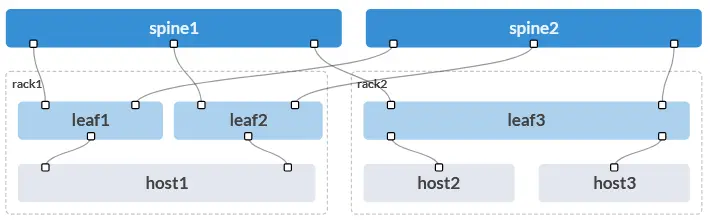
I am using a simple and straightforward 3-stage Clos fabric with the following features:
- Spine layer consisting of 2 spine switches
- Leaf layer consisting of 2 racks
- Rack 1 with a leaf pair consisting of Leaf1 and Leaf2, to which the dual-homed Host1 is connected
- Rack 2 with the standalone Leaf3, to which two single-homed hosts are connected
Part 1 – Underlay Network
This blog post begins by focusing on the underlay network.
IP Addressing
Based on the demo topology, Apstra implements the following underlay design, including IP addressing on the devices:
All internal physical fabric links are configured as Layer 3 point-to-point links, as shown here in the example of the Spine1 configuration:
interfaces {
    ge-0/0/0 {
        description facing_leaf1:ge-0/0/0;
        mtu 9192;
        unit 0 {
            family inet {
                mtu 9170;
                address 172.16.0.0/31;
            }
        }
    }
    ge-0/0/1 {
        description facing_leaf2:ge-0/0/0;
        mtu 9192;
        unit 0 {
            family inet {
                mtu 9170;
                address 172.16.0.2/31;
            }
        }
    }
    ge-0/0/2 {
        description facing_leaf3:ge-0/0/0;
        mtu 9192;
        unit 0 {
            family inet {
                mtu 9170;
                address 172.16.0.4/31;
            }
        }
    }
    [...]
    lo0 {
        unit 0 {
            family inet {
                address 203.0.113.0/32;
            }
        }
    }
}
By default, an MTU of 9192 bytes is set on the physical interfaces and 9170 bytes on the logical L3 interfaces (unit 0) to enable jumbo frames in the overlay services at a later stage.
Each fabric switch is also assigned a loopback interface (lo0), whose IP address serves as the router ID for BGP. On the leaf switches, this interface also functions as a VTEP.
Underlay Routing
The main task of the underlay network is to ensure end-to-end reachability of the loopback interfaces of all leaf switches, as these will later be used as VTEPs for the VXLAN-based overlay services.
Apstra uses External BGP (eBGP) as the dynamic routing protocol in the underlay. Specifically, an eBGP session with the IPv4 address family is established on each P2P link between the spine and leaf switches:
All BGP configurations relevant to the underlay can be found under the group l3clos-l (for all leaf switches) or l3clos-s (for all spine switches).
Taking Leaf1 as an example, you can see that both BGP multipath and multiple-as are set at group level. This is necessary to enable load balancing across all available links on the control plane based on “Equal-Cost-Multipath” (ECMP). If these options were not set, only one of the available paths would be used in each case, in accordance with standard eBGP logic.
protocols {
    [...]
    bgp {
        group l3clos-l {
            type external;
            multipath {
                multiple-as;
            }
            bfd-liveness-detection {
                minimum-interval 1000;
                multiplier 3;
            }
            neighbor 172.16.0.0 {
                description facing_spine1;
                local-address 172.16.0.1;
                family inet {
                    unicast;
                }
                export ( LEAF_TO_SPINE_FABRIC_OUT && BGP-AOS-Policy );
                peer-as 64512;
            }
            neighbor 172.16.0.6 {
                description facing_spine2;
                local-address 172.16.0.7;
                family inet {
                    unicast;
                }
                export ( LEAF_TO_SPINE_FABRIC_OUT && BGP-AOS-Policy );
                peer-as 64513;
            }
            vpn-apply-export;
        }
        [...]
        log-updown;
        graceful-restart {
            dont-help-shared-fate-bfd-down;
        }
        multipath;
    }
For all eBGP neighbours in the underlay, only the IPv4 address family is enabled using family inet unicast, so that all underlay routes can be found in the default routing table inet.0. In addition, BFD is enabled with a detection time of 3x1000ms to address indirect link failures. However, in the event of direct link failures (“Interface Down”), the corresponding eBGP session is terminated immediately.
To ensure that the ECMP principle is actually implemented at the forwarding plane level, the forwarding table export policy PFE-LB is also enabled under the routing-options. Furthermore, ecmp-fast-reroute is used to optimise the switchover time in the event of spine-leaf link failures.
routing-options {
    router-id 203.0.113.2;
    autonomous-system 64514;
    graceful-restart;
    forwarding-table {
        export PFE-LB;
        ecmp-fast-reroute;
        chained-composite-next-hop {
            ingress {
                evpn;
            }
        }
    }
}
[...]
policy-options {
    [...]
    policy-statement PFE-LB {
        then {
            load-balance per-packet;
        }
    }
    [...]
}
The additional configuration option chained-composite-next-hop ingress evpn on all leaf switches is primarily intended to optimise overlay services, but it utilises the underlay VTEP next-hop entries by enabling hierarchical next-hop resolution for EVPN routes.
Furthermore, graceful-restart is enabled globally with the additional option dont-help-shared-fate-bfd-down in the BGP configuration. This enables routes to be preserved and BGP sessions to be restored smoothly during control plane restarts, whilst at the same time, if a peer or link actually fails and this is detected by BFD, all affected routes are immediately withdrawn.
Policy
Leaf-Switches
As can be seen in the configuration excerpt above, the following two export policies are also enabled for the underlay eBGP sessions on all leaf switches:
LEAF_TO_SPINE_FABRIC_OUTBGP-AOS-Policy
Due to the logical AND combination of the policies in the BGP configuration export ( LEAF_TO_SPINE_FABRIC_OUT && BGP-AOS-Policy ), only routes that match both policies are propagated.
In detail, the relevant policies are as follows:
policy-options {
    policy-statement AllPodNetworks {
        term AllPodNetworks-10 {
            from {
                family inet;
                protocol direct;
            }
            then {
                community add DEFAULT_DIRECT_V4;
                accept;
            }
        }
        term AllPodNetworks-100 {
            then reject;
        }
    }
    policy-statement BGP-AOS-Policy {
            term BGP-AOS-Policy-10 {
                from policy AllPodNetworks;
                then accept;
            }
            term BGP-AOS-Policy-100 {
                then reject;
            }
        }
    }
    policy-statement LEAF_TO_SPINE_FABRIC_OUT {
            term LEAF_TO_SPINE_FABRIC_OUT-10 {
                from {
                    protocol bgp;
                    community FROM_SPINE_FABRIC_TIER;
                }
                then reject;
            }
            term LEAF_TO_SPINE_FABRIC_OUT-20 {
                then accept;
            }
        }
    }
    community DEFAULT_DIRECT_V4 members [ 3:20007 21001:26000 ];
    community FROM_SPINE_FABRIC_TIER members 0:15;
These export policies ensure that a leaf switch only propagates its own directly connected IPv4 underlay routes (loopbacks / P2P links) to the spines, whilst at the same time preventing the routes learned from one spine from being propagated to the other spine (-> zigzag-routing). This additional policy-based safeguard is also necessary in this case because both spines use different ASNs, and valley-free routing cannot be guaranteed based on the AS path.
Spine Switches
The policies for the spine switches are slightly different:
SPINE_TO_LEAF_FABRIC_OUTBGP-AOS-Policy
policy-options {
    policy-statement AllPodNetworks {
        term AllPodNetworks-10 {
            from {
                family inet;
                protocol direct;
            }
            then {
                community add DEFAULT_DIRECT_V4;
                accept;
            }
        }
        term AllPodNetworks-100 {
            then reject;
        }
    }
    policy-statement BGP-AOS-Policy {
        term BGP-AOS-Policy-10 {
            from policy AllPodNetworks;
            then accept;
        }
        term BGP-AOS-Policy-20 {
            from protocol bgp;
            then accept;
        }
        term BGP-AOS-Policy-100 {
            then reject;
        }
    }
    policy-statement SPINE_TO_LEAF_FABRIC_OUT {
        term SPINE_TO_LEAF_FABRIC_OUT-10 {
            then {
                community add FROM_SPINE_FABRIC_TIER;
                accept;
            }
        }
    }
    community DEFAULT_DIRECT_V4 members [ 1:20007 21001:26000 ];
    community FROM_SPINE_FABRIC_TIER members 0:15;
}
The spine policies ensure that the spine propagates both its own directly connected routes and all routes learned from leaf switches via BGP to other leaves, tagging them with a community so that leaves do not propagate these routes back to the spines. This also ensures valley-free routing and prevents leaf switches from being used as transit devices.
Verification
Finally, we will look at how end-to-end underlay routing and ECMP load balancing can be verified. For verification purposes, I will again use Leaf1 as an example and examine the following outputs:
- show bgp summary
- show route table inet.0
- show route forwarding-table
show bgp summary

Threading mode: BGP I/O
Default eBGP mode: advertise - accept, receive - accept
Groups: 2 Peers: 4 Down peers: 0
Table          Tot Paths  Act Paths Suppressed    History Damp State    Pending
inet.0
                      16         10          0          0          0          0
[...]
Peer                     AS      InPkt     OutPkt    OutQ   Flaps Last Up/Dwn State|#Active/Received/Accepted/Damped...
172.16.0.0            64512        105        102       0       0       45:10 Establ
  inet.0: 5/8/8/0
172.16.0.6            64513         15         11       0       0        4:30 Establ
  inet.0: 5/8/8/0
[...]
As shown in the output, the two eBGP sessions to the spine switches with different ASNs and the IPv4 Unicast address family are active (Established), and active packets and routes are being exchanged.
show route table inet.0

inet.0: 13 destinations, 21 routes (13 active, 0 holddown, 0 hidden)
Restart Complete
Limit/Threshold: 1048576/1048576 destinations
+ = Active Route, - = Last Active, * = Both

[...]
172.16.0.1/32      *[Local/0] 00:50:03
                       Local via ge-0/0/0.0
[...]
172.16.0.7/32      *[Local/0] 00:50:03
                       Local via ge-0/0/1.0
[...]
203.0.113.0/32     *[BGP/170] 00:47:49, localpref 100
                      AS path: 64512 I, validation-state: unverified
                    >  to 172.16.0.0 via ge-0/0/0.0
203.0.113.1/32     *[BGP/170] 00:07:10, localpref 100
                      AS path: 64513 I, validation-state: unverified
                    >  to 172.16.0.6 via ge-0/0/1.0
203.0.113.2/32     *[Direct/0] 00:50:20
                    >  via lo0.0
203.0.113.3/32     *[BGP/170] 00:07:03, localpref 100, from 172.16.0.0
                      AS path: 64512 64515 I, validation-state: unverified
                       to 172.16.0.0 via ge-0/0/0.0
                    >  to 172.16.0.6 via ge-0/0/1.0
                    [BGP/170] 00:07:03, localpref 100
                      AS path: 64513 64515 I, validation-state: unverified
                    >  to 172.16.0.6 via ge-0/0/1.0
203.0.113.4/32     *[BGP/170] 00:07:02, localpref 100, from 172.16.0.0
                      AS path: 64512 64516 I, validation-state: unverified
                       to 172.16.0.0 via ge-0/0/0.0
                    >  to 172.16.0.6 via ge-0/0/1.0
                    [BGP/170] 00:07:02, localpref 100
                      AS path: 64513 64516 I, validation-state: unverified
                    >  to 172.16.0.6 via ge-0/0/1.0
The default routing table inet.0 contains all underlay routing information. It is clear that the loopback IPs of the other leaf switches (203.0.113.3/32 and 203.0.113.4/32) are received and are available via two AS paths (= two spines).
show route forwarding-table
Routing table: default.inet
Internet:
Destination        Type RtRef Next hop           Type Index    NhRef Netif
default            perm     0                    rjct       36     1
0.0.0.0/32         perm     0                    dscd       34     1
[...]
203.0.113.1/32     user     1 172.16.0.6         ucst      578     8 ge-0/0/1.0
203.0.113.2/32     intf     0 203.0.113.2        locl      512     1
203.0.113.3/32     user     0                    ulst  1048574     3
                              172.16.0.0         ucst      577     8 ge-0/0/0.0
                              172.16.0.6         ucst      578     8 ge-0/0/1.0
203.0.113.4/32     user     0                    ulst  1048574     3
                              172.16.0.0         ucst      577     8 ge-0/0/0.0
                              172.16.0.6         ucst      578     8 ge-0/0/1.0
[...]
255.255.255.255/32 perm     0                    bcst       32     1
This output also allows us to verify the forwarding table and the implementation of ECMP load balancing. Here, too, we can see that the two loopback IPs of the remote leaves are each reachable via two active next hops in the underlay.
Conclusion
I hope this first part of the series provides a good overview and a better understanding of the design and implementation of the underlay network in Apstra-managed DC fabrics with Juniper fabric switches. I think it already illustrates how certain design decisions (e.g., different spine ASNs) impact the configuration and its complexity (e.g., ensuring loop- and valley-free routing through custom BGP policies).
In the next part of the series, I will go into more detail about the implementation of the EVPN overlay.