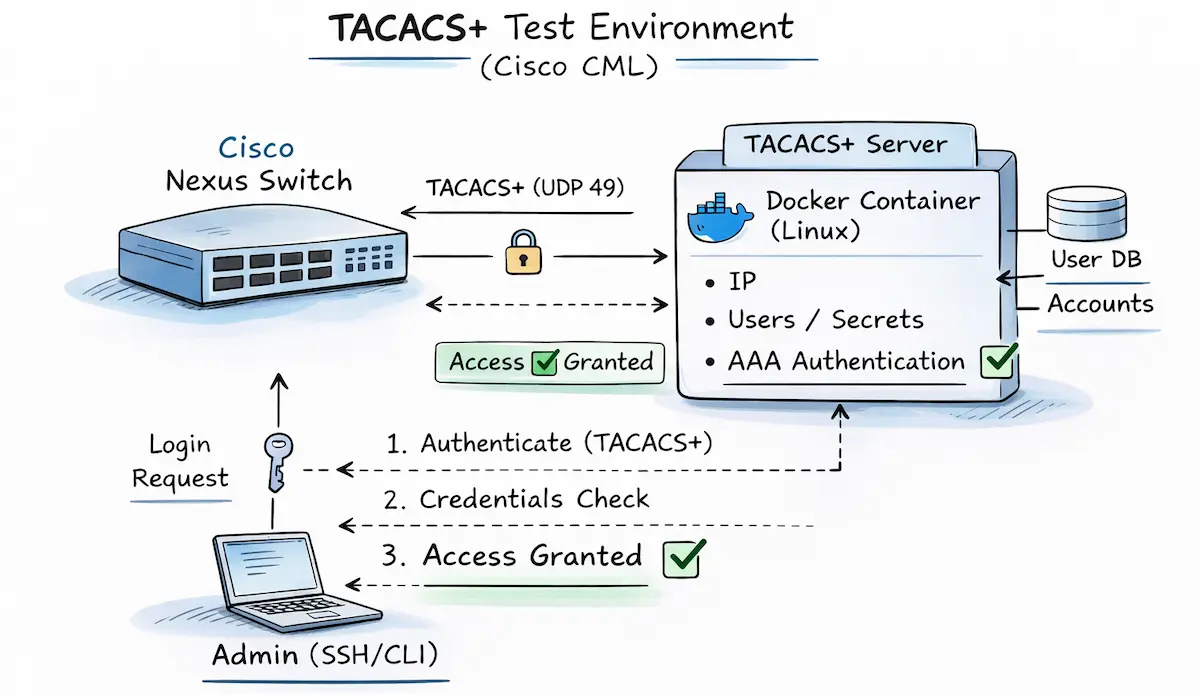
The initial situation
One of my customers recently needed assistance with AAA integration of their Cisco Nexus 9k data center switches via TACACS+ to a Cisco ISE as an authentication server. I offered to compile the necessary commands for NX-OS and then set them up together with them.
The challenge for me was that I had no relevant hands-on experience with Cisco Nexus to date and therefore could not refer to any corresponding sample configurations. So, the first step was to compile the necessary lines in NX-OS syntax using the official configuration guides.
My first draft of a corresponding template looked like this:
feature tacacs+
!
tacacs-server host {{ tacacs-server.ip }} key {{ tacacs-server.key }}
ip tacacs source-interface {{ mgmtInt }}
!
aaa group server tacacs+ AAA_TACACS
 server {{ tacacs-server.ip }}
 source-interface {{ mgmtInt }}
aaa authentication login default group AAA_TACACS
aaa authentication login console group AAA_TACACS
aaa accounting default group AAA_TACACS
aaa authentication login invalid-username-log
aaa authentication login error-enable
However, I didn’t want to just blindly hand over a few configuration commands with the note “should work in theory,” but rather verify the actual functionality in advance. This also has the advantage of familiarizing myself with the necessary troubleshooting methods in case it doesn’t work right away. 🤓
Cisco Modeling Labs to the rescue
Cisco CML version 2.9 is ideal for this task, as it has both a Cisco Nexus 9000v image and a Cisco ISE appliance.

Cisco ISE – the heavyweight
However, before you rush into clicking together and starting the lab, including the Identity Services Engine, I recommend taking a look at the corresponding Installation Guide. Even in the minimal “evaluation” deployment, the ISE requires an impressive 300GB of storage space, which could certainly cause difficulties for some CML hosts. Since HW resources are not infinitely available and I did not need a fully operational ISE instance for my use case, an alternative had to be found.
TAC_PLUS Container – the smart alternative
Interestingly, Cisco CML v2.9 not only integrated a virtual ISE, but also support for Docker containers. This makes it possible to use simple containerized applications in addition to the typical VM-based nodes. Cisco has also packaged a few very useful examples – in addition to typical network services (DNS, DHCP, TFTP, Syslog), web browsers and servers, and other tools, there is also a RADIUS and a TACACS+ container.
This TACACS+ server is based on the tac_plus daemon, which was originally developed and maintained by Shrubbery Networks. For my simple use case, it was perfectly sufficient and exactly what I was looking for.
The setup
So, in my lab, I simply replaced ISE with the simple tac_plus daemon. Using this container is also very easy, as it already has a predefined basic configuration that includes a simple policy set and the definition of the NAS devices, including a shared secret. This configuration file can be viewed via the node tab “Config” > “Configuration File”: “tac_plus.conf”:
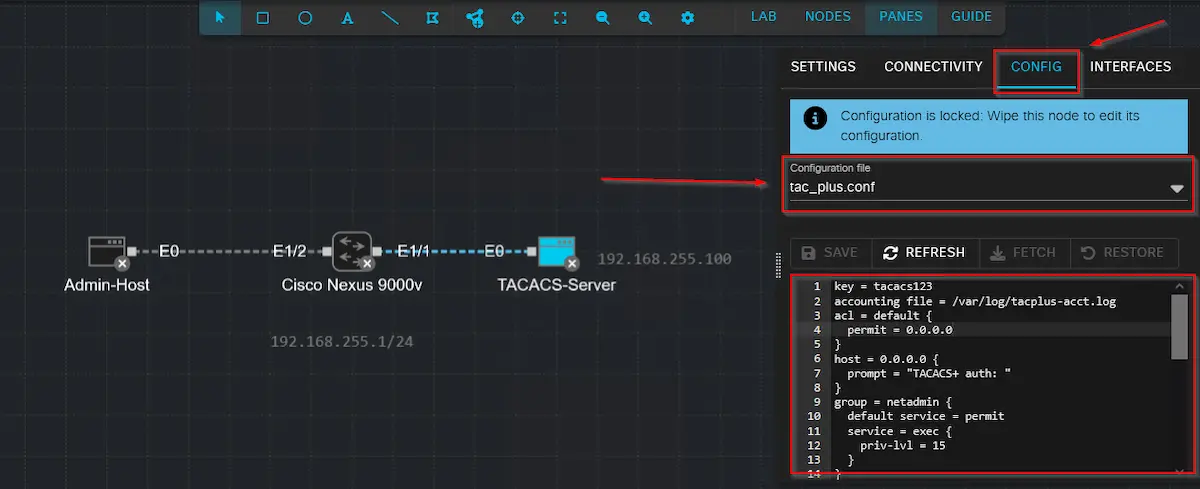
If necessary, the configuration can of course be customized and expanded. Unfortunately, there is no current and complete documentation, but I find the following links quite helpful:
In addition to the TACACS configuration, the container also needs an IP configuration for the interface that connects it to our Cisco Nexus. As with all Linux hosts and containers in CML, you can use a simple startup script (“Config” > “Configuration File”: “boot.sh”) to define the settings statically during startup.
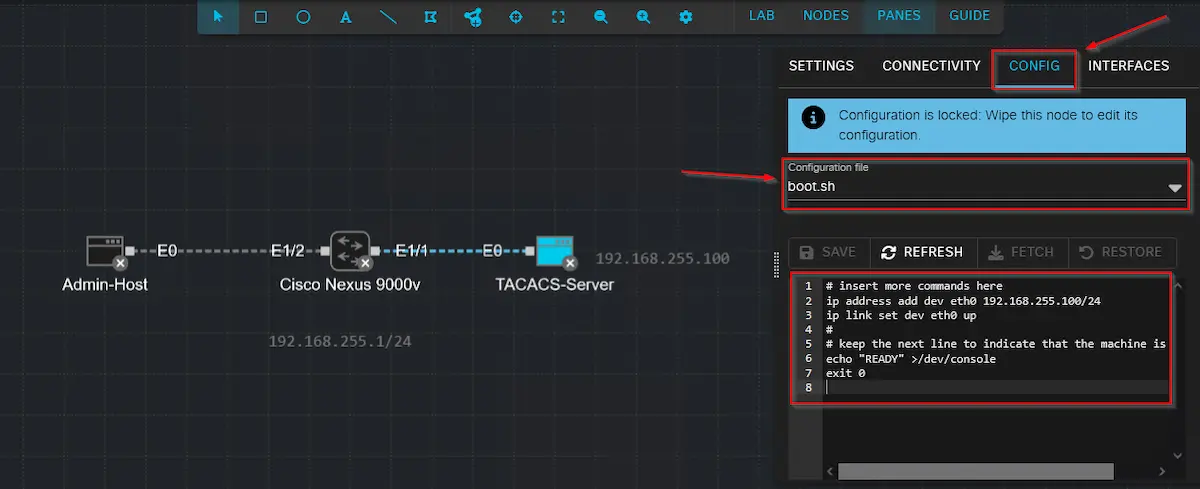
Finally, all that remains is to finalize and roll out the Cisco Nexus configuration, including the AAA commands for connecting to the TACACS container:
feature tacacs+
feature interface-vlan
!
tacacs-server host 192.168.255.100 key tacacs123
ip tacacs source-interface Vlan10
!
aaa group server tacacs+ AAA_TACACS
 server 192.168.255.100
 source-interface Vlan10
aaa authentication login default group AAA_TACACS
aaa authentication login console group AAA_TACACS
aaa accounting default group AAA_TACACS
aaa authentication login invalid-username-log
aaa authentication login error-enable
!
vlan 10
  name AAA_Test
!
interface Vlan10
  no shutdown
  ip address 192.168.255.1/24
!
interface Ethernet1/1
  switchport access vlan 10
  spanning-tree port type edge
!
interface Ethernet1/2
  switchport access vlan 10
  spanning-tree port type edge
Unexpected problems
Now that all systems were wired and prepared, it was time for the final test, which consisted of opening an SSH session from the Linux hosts to the Cisco Nexus and then logging in with the information stored on the TACACS server. However, to my disappointment, I discovered that it was not possible to log in with either the tacadmin user or the tacoper user, and SSH access was therefore denied ⛔🙁. Since my console session via the CML node was still active, I was able to further narrow down the problem in this way.
By evaluating the corresponding debug logs on the switch and the logs on the TACACS server, I was at least able to verify that the requests were being received by the server and were not being rejected due to an incorrect key. The problem must therefore lie elsewhere, and during further troubleshooting, I came across the following log on the server:
connect from 192.168.255.1 [192.168.255.1]
pap-login query for 'tacadmin' port 0 from 192.168.255.1 rejected
login failure: tacadmin 192.168.255.1 (192.168.255.1) 0
Apparently, there was a problem with the authentication protocol in the interaction between Cisco Nexus and the TACACS server. Unless configured otherwise, NX-OS sends the TACACS request via simple PAP authentication. The tac_plus container does not seem to accept this in the current configuration. I therefore looked up the Configuration Guide for NX-OS again and found that this behavior can also be changed to ASCII authentication using the following command:
aaa authentication login ascii-authentication
And here we go 💡 – after adding the command on the Nexus, I was finally able to log in successfully with the various users. Also the authorization of the corresponding permission levels (admin/read-only) worked as desired ✅. The corresponding logs on the server then look as follows:
connect from 192.168.255.1 [192.168.255.1]
login query for 'tacadmin' port 0 from 192.168.255.1 accepted
connect from 192.168.255.1 [192.168.255.1]
Start authorization request
do_author: user='tacadmin'
user 'tacadmin' found
exec authorization request for tacadmin
exec is explicitly permitted by line 11
nas:service=shell (passed thru)
nas:cmd= (passed thru)
nas:cisco-av-pair* svr:absent/deny -> delete cisco-av-pair* (i)
nas:shell:roles* svr:absent/deny -> delete shell:roles* (i)
nas:absent, server:priv-lvl=15 -> add priv-lvl=15 (k)
replaced 2 args
authorization query for 'tacadmin' 0 from 192.168.255.1 accepted
Conclusion
In conclusion, the Tacacs Server Container Image is an extremely useful and lightweight container available in CML version 2.9 and higher, which allows you to quickly test AAA functionalities in combination with various devices and configurations. If there is also a requirement to implement additional AAA functionalities via RADIUS, CML v2.9 also includes a corresponding FreeRADIUS Container, as mentioned above. This means that for simple use cases and integration tests, it is no longer necessary to implement a resource-intensive Identity Services Engine node including complex policy logic.
If you want to try it out for yourself but want to avoid the pitfalls that tripped me up, you can download the complete CML Lab, including all configurations, from the associated GitHub repository.